

👉 Launch the ExoMagic Card Fanning Studio
Whether you’re tweaking a custom back design in Photoshop, building a portfolio, or just exploring how a geometric pattern looks in motion, seeing a flat image file isn’t enough. Cardistry is about flow, depth, and how geometric lines interact when a deck is handled.
That’s why we built the ExoMagic Card Fanning Studio.
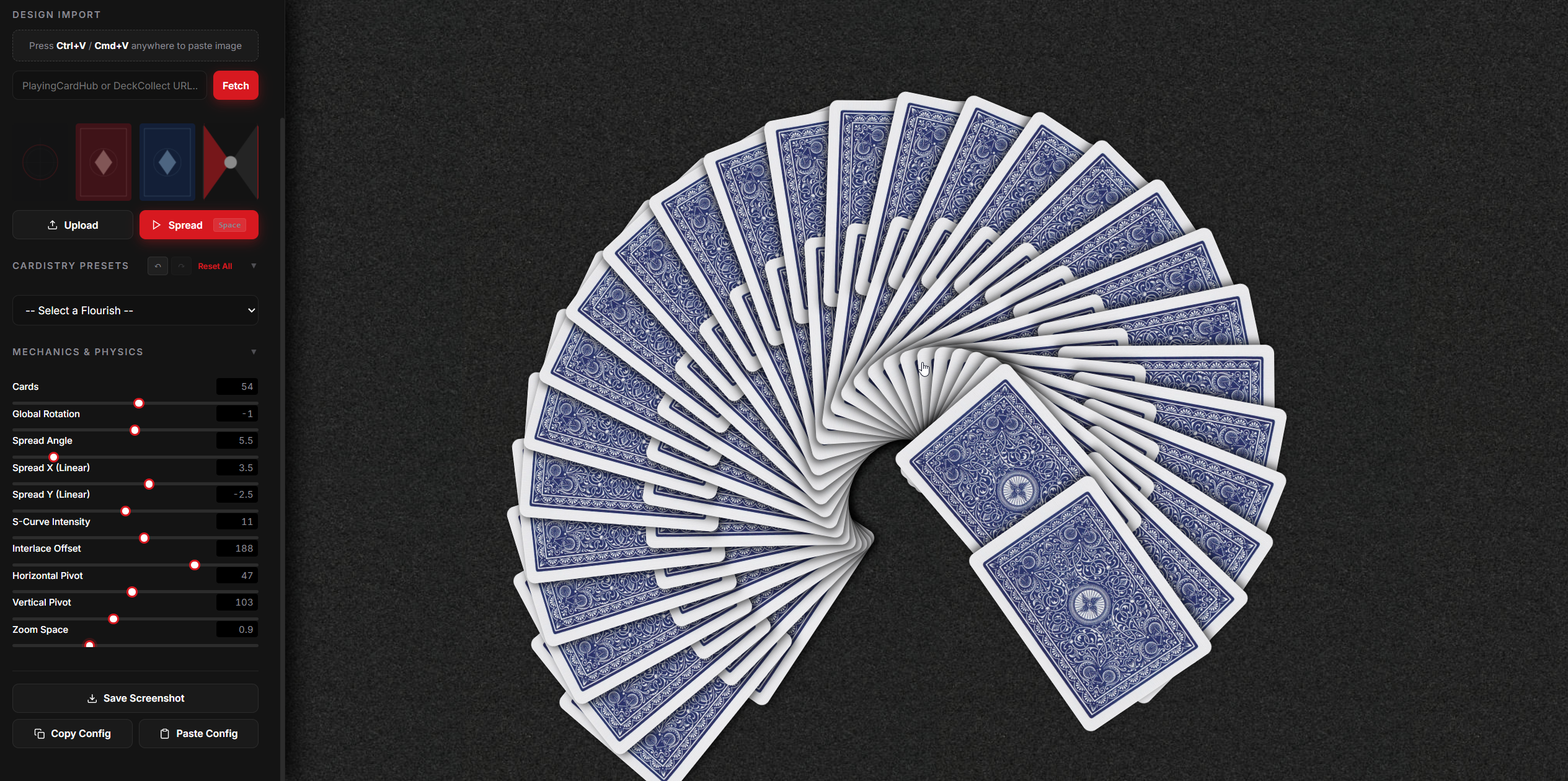
It’s a free, browser-based 3D visualization tool designed specifically for cardists, magicians, and playing card designers. You can take any card back image and instantly test it inside realistic cardistry spreads with full control over the physics.
Key Features
- Instant Paste (
Ctrl+V/Cmd+V): No need to save a temporary file to your desktop. Copy your artwork from Photoshop, Illustrator, or a screenshot tool, click anywhere on the app, and paste. - PlayingCardHub & DeckCollect Import: Want to see how a published deck looks in a custom display? Paste a URL from PlayingCardHub or DeckCollect, and the studio automatically pulls the card back for you.
- Realistic Flourish Presets: Toggle through classic moves like the Standard Fan, an Interlaced Mega Fan, Circular Fans, Table and Hand Ribbon Spreads, Mirrored S-Shapes, and even an animated Pirouette Spinner.
- Precision Control: Fine-tune the card count (from 1 to 104 cards), global rotation, linear X/Y offsets, sine-wave curve intensity, and custom pivot points. Every slider is dual-synced with direct numerical inputs if you prefer entering exact figures.
- Interactive Inspection: Click on any individual card in the middle of a fan to pull it out for a closer look, or move your cursor across the screen to feel the subtle 3D parallax tilt.
How to Use It
- Open the studio right in your browser (works on desktop and mobile, with zero plugins to install).
- Add your design via clipboard paste, direct upload, or by selecting one of our pre-loaded sample backs.
- Choose a flourish preset from the dropdown menu to instantly map the layout.
- Hit Spread (or tap the
Spacebar) to trigger a smooth opening animation. - Tweak the mechanics, switch up the background surface (felt, wood, marble, or dark studio), and screenshot your setup.
Try It Out Now
The tool is live today. Give it a run with your latest design, experiment with some wild physics configurations, and let us know what flourishes you want to see added next.
👉 Launch the ExoMagic Card Fanning Studio